
Mastercard JS API
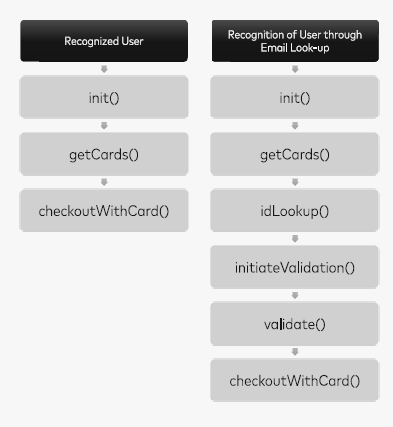
The following API methods must be invoked during the checkout process. Refer to the Mastercard SDK documentation for full payload details and flow handling:
- Init() - Must be called only after successfully loading ths JS SDK.
- getCards()
- idLookup()
- initiateValidation()
- validate()
- checkoutWithCard()
- signOut()
UI Suggestion
As you are not PCI DSS certified, please disable the Add Card option in the src-sdk UI by setting: display-add-card="false" while defining the custom element.
Display an information message to customers advising them to add or manage cards in their Click to Pay profile at www.src.mastercard.com/profile/ when no cards for listing, sample UI below:
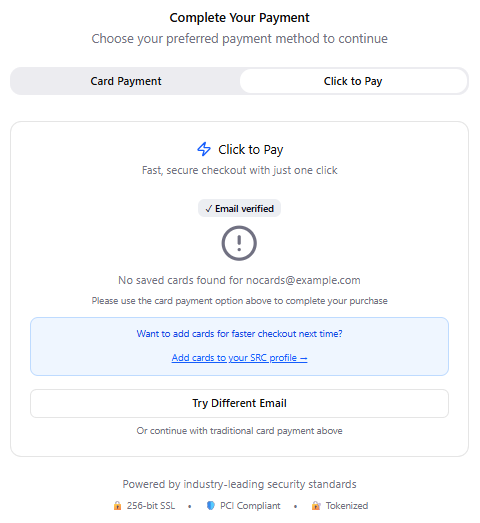
Sample UI
Handle the checkoutWithCard response for checkoutActionCode: ADD_CARD the same way as above (redirect or message to manage cards externally).
Order API
Once checkoutWithCard is invoked
- Check the value of checkoutActionCode.
- If checkoutActionCode = COMPLETE, call the Order API with the clicktopay parameters.
"paymethod": "clicktopay",
"clicktopay": {
  "merchantTransactionId": "<merchant-transaction-id from C2P JS>",
  "correlationId": "<srcCorrelationId from C2P JS>",
  "flowId": "<x-src-cx-flow-id from C2P JS>"
}
- Fallback to regular card flow in case of failure.
- Handle the ORDER API response same as existing flow.
Sandbox profile can be created at https://sandbox.src.mastercard.com/profile